v1.0 · Available now · Windows 10/11 (64-bit)

The lighter way to edit your hosts file — with per-app firewall control and instant profiles.

HOTS Hosts Lite is a free, open-source hosts file editor for Windows — a smaller, focused sibling of HOTS Hosts. Hosts file locking, a custom domain blocklist, 3 saved profiles, and per-app firewall blocking, without the extra layers.

GPLv3 · free & open source 🔒 No data collected · no ads No account needed EN · PL · FR · DE · ES · PT · RU
Free download, no trial, no hidden costs · Windows will ask to confirm admin rights on first run
👤 Built and maintained by one person, in spare time
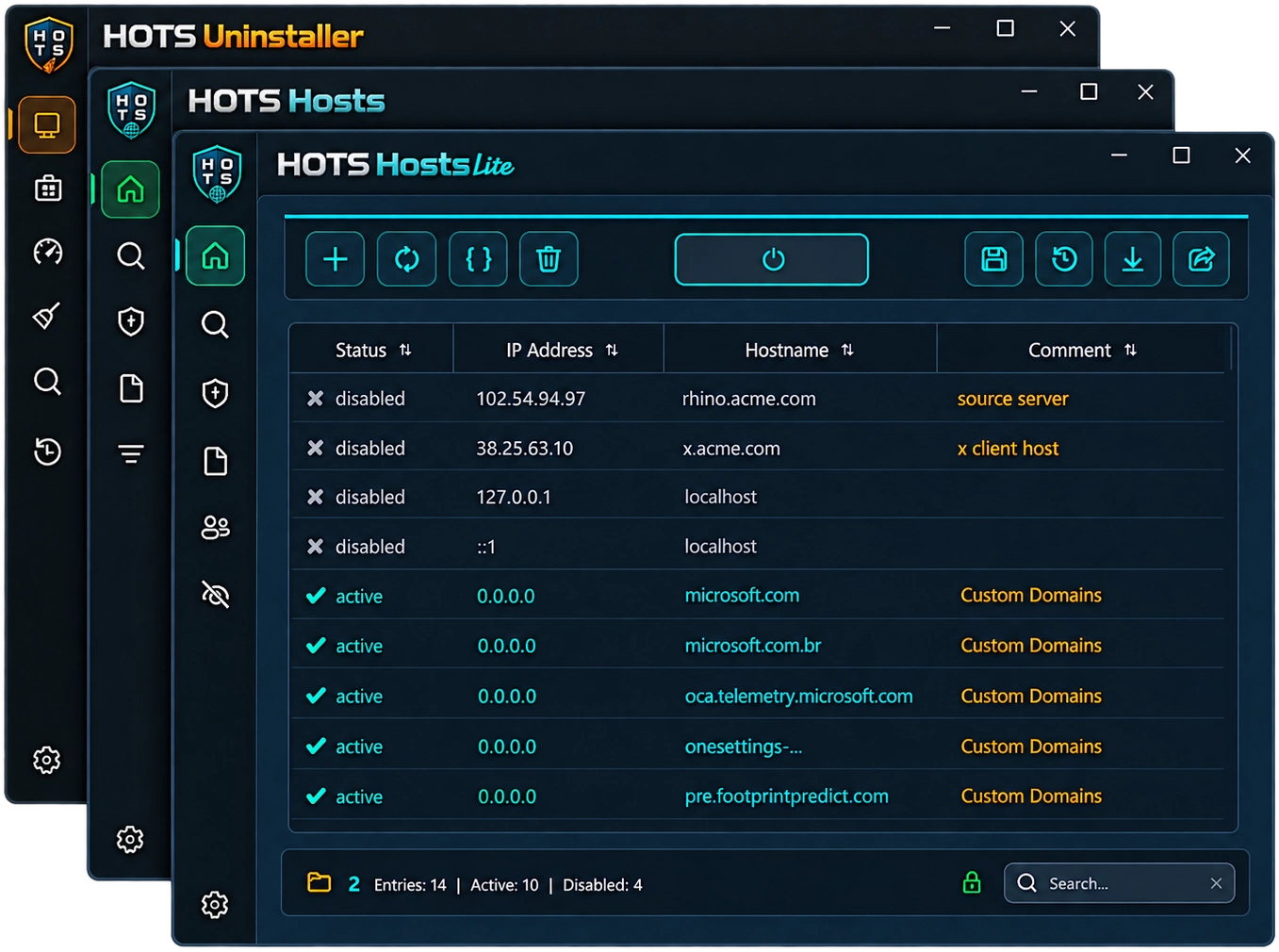
HOTS Hosts Lite — hosts file table editor HOTS Hosts Lite — Features tab: hosts lock, custom domains, profiles, firewall HOTS Hosts Lite — per-app firewall blocking HOTS Hosts Lite — suspicious entry detection HOTS Hosts Lite — domain existence check HOTS Hosts Lite — raw hosts text mode HOTS Hosts Lite — in-app support page
Click to enlarge
Real HOTS Hosts Lite screenshots — table editor, Features tab, Firewall, Diagnostics, raw mode, and support.
# what's inside

Four building blocks, one lightweight app

HOTS Hosts Lite isn't a stripped-down demo — it's a focused rebuild, with a couple of things the full app doesn't have.

Core Editing & Safety

Everything you'd expect from a proper table editor, plus a safety net under every save.

  • Toggle, don't delete — flip an entry off without losing it
  • Bulk paste multiple "IP hostname" lines at once, with column sorting and live search
  • Auto-backup before every save — rotating archive per profile (15 kept on the default profile, 10 each on profiles 2 and 3)
  • Diff preview before writing, plus post-save verification
  • Import/export to .txt or .csv, with a 20,000-entry cap to protect the Windows DNS Client

Diagnostics

The same domain and malware checks as the full app — catches entries that are quietly broken or actively dangerous.

  • Domain existence check — queries Google/Cloudflare public DNS directly and in parallel, bypassing your local hosts file
  • Malware scanner — checks entries against a dozen-plus risk signals:
    redirected system/payment domains redirect to public IP raw-IP hostnames Unicode homoglyphs zero-width characters Punycode hostnames fuzzy-matched typosquatting
  • Known-safe subdomains and CDNs are auto-whitelisted, plus a per-entry ignore list so confirmed-safe results stop reappearing

Profiles & Firewall NEW

The two headline additions in Lite — neither exists in the full HOTS Hosts.

  • 3 saved profiles — full snapshots of your hosts file, saved to their own slots. Switch instantly with one click, no manual save step
  • Per-app Firewall blocking — block a program's outbound and/or inbound traffic independently, backed by real Windows Firewall rules (netsh advfirewall). Search installed apps or point at any .exe
  • Missing-file cleanup — flags entries whose .exe disappeared (e.g. after an uninstall) and offers to remove them; skips removable/network drives so it won't nuke a rule for a USB app that's simply unplugged

Hosts Lock & Custom Domains

The two enforcement tools kept from the full app's Parental/Privacy modules, merged into one Features tab.

  • 🔒 Hosts file lock — denies write/delete access to the hosts file at the Windows permission level, so entries can't be edited from outside the app
  • 📝 Custom domain blocklist — a free-text list for any domain you want blocked, stored separately so it survives a hosts restore or an uninstall
  • Both live as toggle-able cards right next to Profiles and Firewall — one tab, no hunting through menus
🌗 Dark & Light themes — switch anytime in Options 🎨 4 accent colors — Gold, Red, Green, Blue 💾 Auto-backup — per-profile rotating archive 🔄 Built-in update checker — pulls the latest release from GitHub 🔑 Password protection — required to open the app and to uninstall it 📤 Import & Export — .txt hosts format or .csv 📝 Raw text view 🌐 7 languages — EN, PL, FR, DE, ES, PT, RU
# which one

HOTS Hosts vs. HOTS Hosts Lite

Two separate tools under HOTS Tools, not a paid/free split — pick based on what you actually need to lock down. They run independently and don't conflict with each other.

the full toolkit

HOTS Hosts · v2.1

For locking down a shared or family PC at the network and system level.

  • Cloudflare Family DNS + 15-category parental blocklists
  • Tiered privacy control — 37 tweaks across 4 levels
  • App & VPN client launch blocking (IFEO + ACL)
  • DNS-over-HTTPS blocking across 4 browsers
  • System Restore integration + rstrui.exe blocking
  • 5 languages
Go to HOTS Hosts →
you are here

HOTS Hosts Lite · v1.0

For a fast, personal hosts editor with a bit of enforcement — nothing you have to configure across four tabs.

  • Hosts file lock + custom domain blocklist
  • 3 saved profiles, one-click switching
  • Per-app Firewall blocking — in/out independently
  • 7 languages (2 more than the full app)
  • Same core editor, backups, and Diagnostics as HOTS Hosts
# get started

Two ways to run it

Grab the .exe if you just want it working, or build from source if you'd rather verify the code first.

Option A — Run the installer (recommended)

  • 1Download HOTS_Hosts_Lite_setup.exe from the Releases page
  • 2Double-click — UAC will prompt for Administrator rights
  • 3Follow the setup wizard. Done. No further setup required.
About the SmartScreen warning

HOTS Hosts Lite is a small independent project without a paid code-signing certificate, so Windows SmartScreen may warn that it "isn't commonly downloaded." That's expected for any new unsigned .exe — it doesn't mean the file is unsafe. Click More info → Run anyway, or build from source yourself if you'd rather verify first.

Option B — Run from source

Command Prompt
$ pip install PySide6 "PySide6-Fluent-Widgets[full]"
$ git clone https://github.com/darsono6/HOTS-Hosts-Lite.git
$ cd HOTS-Hosts-Lite
$ pythonw hosts_editor_launcher.pyw
✓ launching HOTS Hosts Lite…

Requires Python 3.10+, PySide6 and PySide6-Fluent-Widgets. The launcher requests Administrator rights itself via UAC — no need to open an elevated prompt first.

# faq

Questions people actually ask

Will this slow down my PC or internet?
Generally no — HOTS Hosts Lite doesn't run as a background service or monitor your traffic. The one honest exception is the hosts file itself: Windows' own DNS Client service loads the whole file into memory, so an extremely large one can genuinely slow down DNS lookups. That's why HOTS Hosts Lite enforces a 20,000-entry safety limit and blocks saves beyond it — for anything under that, you won't notice a difference.
Is any of my data collected or sent anywhere?
No. There's no telemetry, no analytics, no account, and no ads. The only network requests it makes are ones you trigger yourself — checking a domain, or checking for app updates.
What does the per-app Firewall blocking actually do?
It adds real Windows Firewall rules for a program you pick — nothing is blocked automatically. You choose the app, then block its outbound traffic, inbound traffic, or both, independently of each other. It's off by default and only ever affects programs you explicitly add to the list.
What happens to my saved profiles if I uninstall?
Your 3 hosts profiles and their backups live next to the hosts file itself, not inside the app's own settings folder — so they survive an uninstall. Only the app's own settings (theme, password, language) get removed with it.
Does it work on Windows 7, 8, or 32-bit systems?
No — HOTS Hosts Lite requires Windows 10 or 11, 64-bit.
Is it actually open source, or just "source available"?
Fully open source under GPLv3 — the entire codebase is public on GitHub, so you (or anyone) can read exactly what it does before trusting it with Administrator rights.

❤️ Support the project

"Hi, I'm Darsono. HOTS Hosts Lite is a project I build in my free time, completely free of charge. If you enjoy it and it makes your work easier — or maybe you're just having a good day — you can support its development. I'll be truly grateful for any amount, even a small one."

HOTS Hosts Lite is a personal hobby project, released free under GPLv3. If it saves you time or you just want to say thanks, any amount is appreciated — no registration required.

📄 License & disclaimer

Released under the GNU GPLv3. Provided in good faith but without any warranty — modifying the hosts file and firewall rules affects system-level network behavior, so use with care. You use this software at your own risk.

© 2026 Darsono

hots.support@gmail.com

Get HOTS Hosts Lite and get started.

Free and open source, released under GPLv3. No data is collected or sent anywhere, and there are no ads.